Easy Line Remote
- 4.4
- Rating
- 100.00K
- Installs
- Free
- Price

 Analysis by App-foxy
If you are new to hearing-support apps, Easy Line Remote is best understood as a companion for compatible hearing devices rather than a replacement for professional care. I found its main appeal in the way it brings everyday control and personal tracking into one mobile experience. The app is free, aimed at everyone, and developed by Sonova AG, so the first thing to expect is a practical medical tool rather than a general sound-amplification app.
Its store summary focuses on a personalized hearing experience and health data tracking, which matches the way I approached it: not as something that magically fixes hearing, but as a way to make the devices you already use feel easier to manage. That distinction matters. If you do not have a compatible hearing solution, this is unlikely to be useful on its own. If you do, the app can reduce the need to adjust things manually and can help you pay closer attention to how your hearing routine fits into daily life.
The app has built a solid audience, with an average rating of 4.3 from around five thousand ratings and more than one hundred thousand installs. Those figures suggest that it is not an obscure utility, but they should not be read as a guarantee that every phone and hearing-device combination will behave identically. In my experience with companion apps, compatibility and connection quality often shape the experience as much as the interface itself.
You May Also Like

 Blood Strike: 2.5 Anniversary
Blood Strike’s Loadouts Turn Every Drop Into a Tactical Gamble
A close look at Blood Strike’s custom loadouts: how fast access to signature weapons reshapes its battle royale rhythm, rewards preparation, and narrows the gap between fights.

 Pandora - Music & Podcasts
Pandora’s Music Is Easy to Start, but Harder to Recover
Pandora’s strength is its low-effort path from a seed to a station. Its weak spot is how much confidence it asks you to place in connection, setup, and quiet recovery.

 8 Ball Pool
 Is Built on Rivalries, Rematches, and Routine
A close look at the rivalries, rematches, shared routines, and unanswered safety questions that turn a quick pool match into a persistent mobile community.

 Samsung Music
’s Quiet Strength Is Playing What You Already Own
Its reach comes less from spectacle than from dependable access to a personal library. That simplicity is both the app’s strongest retention engine and its ceiling.

 AccuWeather: Weather Radar
AccuWeather Review: A Quick, Clear Forecast for Everyday Decisions
For everyday plans, the best forecast is the one you can understand quickly. AccuWeather makes rain timing, radar, and local conditions easy to act on, with a few trade-offs.

 Hill Climb Racing
Why Hill Climb Racing Still Turns Crashes Into One More Run
A tiny car, a bumpy hill and one more upgrade: Hill Climb Racing keeps resurfacing because its simple chaos makes every near-miss feel personal.
More From Our News Desk



Getting from installation to a useful first session
I’d make the first session about learning the connection, not trying to master every control at once. I’d keep the hearing devices close, follow each setup prompt, and note what the app can access so I know where to return later. Once that groundwork feels steady, the next section looks at how a small, deliberate adjustment can make the app useful in an ordinary conversation.
What the first launch feels like
Easy Line Remote is currently at version 7.5.1 and requires an operating system version of at least 10. That makes checking your phone before installation a sensible first step, especially if you are helping a parent or another family member. A successful installation is only the beginning; the meaningful part is establishing communication with the hearing equipment and understanding which controls are available in your particular setup.
I recommend starting in a quiet room, with the hearing devices charged and close to the phone. This is not because the app needs a complicated ritual, but because a calm environment makes it easier to notice whether a change has actually helped. Trying to pair devices for the first time in a busy restaurant or outdoors can make ordinary background noise feel like a technical problem.
During setup, take your time with any on-screen instructions and avoid tapping through them simply to reach the main screen. A first-time user usually wants answers to three practical questions: can the phone see the hearing devices, can the app change their behavior, and where can personal information or hearing-related tracking be viewed? The clearest way to learn those answers is to complete the initial process without multitasking.
I would also keep the phone unlocked and nearby while setting things up. Bluetooth-based accessories can appear to be connected and then behave differently once the phone moves away or the app is closed. When a connection seems uncertain, returning to the app and checking its current device status is more useful than repeatedly changing random phone settings.
The first meaningful success
The first success should be small and easy to verify. Once the devices are connected, make one controlled adjustment and listen for a clear difference in the same sound. For example, sit in a quiet room, play a familiar conversation or listen to someone speaking, then apply one available change through the app. Do not alter several things at once. If the result is better, you will know which action helped; if it is worse, you can undo that single change without losing your starting point.
This one-change-at-a-time approach is more valuable than it sounds. Hearing adjustments can be subtle, and a user who changes volume, listening mode, and other settings together may not know what caused comfort or discomfort. I found the app more reassuring when I treated it as a remote control with a learning curve, not as a panel that needed to be mastered immediately.
A realistic everyday example is a family conversation after dinner. Suppose voices become harder to follow as several people speak around the table. Instead of leaving the conversation or asking someone else to handle the hearing devices, you can use the phone to make an adjustment while remaining seated. The benefit is not just convenience. It gives you a discreet way to respond to a changing environment without turning the moment into a technical interruption.
That same scenario shows why the app is more useful than a basic physical control for some people. A button on a hearing device may be perfectly adequate at home, but a phone interface can be easier to understand when you are still learning what each adjustment does. It also gives a caregiver a clearer way to help, provided the user is comfortable sharing the phone and making changes together.
How to use the tracking side without overthinking it
The health-data element deserves a measured approach. I would use it as a way to notice patterns, not as a medical diagnosis or a score to chase. If your routine changes from day to day, looking at the available history can help you connect hearing-device use with situations such as conversations, work, travel, or quieter time at home.
One useful habit is to review the information at the same time each week rather than checking it constantly. A weekly glance is more likely to reveal whether you are regularly avoiding certain situations or forgetting to use the devices for long periods. It can also give you a more concrete starting point for a conversation with a hearing professional. The app may help you describe your routine, but it does not replace an assessment or treatment plan.
Another practical tip is to add context mentally when you look at a pattern. A lower-use day might reflect travel, illness, a quiet weekend, or a device issue. The number alone cannot explain the reason. I would avoid interpreting a single day as proof that your hearing has improved or worsened. The tracking feature is most useful when paired with your own notes about what was happening around you.
Confusion that can happen during normal use
The most common source of confusion is expecting the app to work like a universal hearing booster. It is designed around a compatible hearing setup, not around turning any pair of headphones or any phone into a complete hearing solution. If the app cannot find the equipment you expect, first consider whether the devices are supported and ready to connect before assuming the app itself is broken.
Another point that can surprise new users is that the phone, the app, and the hearing devices are three separate parts of the experience. A phone can be online while the hearing devices are not communicating properly. The app can be installed while initial pairing is incomplete. Treating those as separate checkpoints makes troubleshooting less frustrating: confirm the devices are powered, keep them close, then reopen the app and follow its connection guidance.
It is also easy to confuse a change in the app with a permanent change to the hearing devices. I recommend making adjustments in familiar environments first and observing how they affect comfort. If a setting helps in a noisy café, it may not be the best choice for reading quietly at home. Personalized control is useful precisely because different situations call for different responses.
Users should also be patient with themselves. Someone who has never used a hearing companion app may need several sessions before the controls feel natural. The interface can make adjustments more accessible, but it cannot remove the normal process of learning which settings suit particular environments. I would rather see a new user make one careful change and remember it than explore every option in one sitting and become unsure of the original setup.
Where it differs from the usual alternatives
Compared with relying only on the physical controls of hearing devices, Easy Line Remote offers a more visual and phone-based way to manage the experience. That can be especially helpful for people with limited dexterity, for users who find tiny controls difficult to identify, or for family members assisting someone during the first weeks of use. The trade-off is that you become more dependent on the phone and on a stable connection between the phone and the devices.
Compared with a generic sound-amplification app, this is the more appropriate direction for someone already using compatible hearing equipment. A generic app may be tempting because it appears simpler, but it does not provide the same device-specific companion role. On the other hand, a person who only wants occasional audio amplification and does not use compatible hearing devices may find a general accessibility feature or another type of tool more suitable.
It also occupies a different space from a hearing clinic visit. A clinic can evaluate hearing, adjust equipment professionally, and address problems that software cannot solve. Easy Line Remote is strongest between those appointments, when you need convenient day-to-day control or want to understand your own usage pattern. I would not use it to postpone professional help when hearing suddenly changes, discomfort persists, or the devices no longer seem to perform normally.
Who will get the most from it
I think the app is a good fit for a first-time hearing-device user who wants a gentler way to learn everyday adjustments. It is also useful for someone who moves between quiet and noisy environments and prefers not to handle the devices directly each time. A caregiver may appreciate having a shared, visible process for helping with setup, although the hearing-device owner should remain involved in decisions about comfort and use.
The tracking tools may appeal to users who want to discuss their routine more clearly with a professional. Instead of saying “I do not use them much,” you may be able to identify when that happens and think about the reason. That turns a vague complaint into a more useful conversation about comfort, environment, fit, or confidence.
I would be more cautious about recommending it to someone who expects an app to solve untreated hearing loss, someone whose phone cannot meet the operating-system requirement, or someone who strongly dislikes using a smartphone for essential controls. In those cases, a direct device-control routine or professional guidance may be less frustrating. The app adds convenience, but convenience is only valuable when the user is comfortable with the technology behind it.
My practical routine for new users
After installation, I would divide the first week into three short stages. On the first day, focus only on pairing and confirming that the app can communicate with the hearing devices. On the next quiet day, test one adjustment during a familiar conversation. Later, review the tracking area and ask what the information tells you about your routine, rather than trying to optimize everything immediately.
Keep a simple mental note of situations that remain difficult. Is the problem a crowded room, a television, a soft-spoken person, or the physical comfort of wearing the devices? This distinction matters because an app adjustment may help one issue while a professional fitting or hearing review may be needed for another. Easy Line Remote is most effective when you use it to make observations and small changes, not when you expect it to explain every difficulty.
If a family member is helping, let that person learn the basic flow with you rather than taking over completely. The goal is independence, and a user who understands how to reconnect, make a modest adjustment, and review personal tracking information will be less anxious when away from home. I found that confidence grows faster when the first successful action is simple and repeatable.
There is also a privacy and comfort question in any health-related app. Before making tracking part of your routine, decide whether you actually want that information to guide your conversations and habits. Some users will find it motivating; others may feel pressured by constant monitoring. The feature should serve your hearing routine, not become another source of worry.
My final take after using it
Easy Line Remote succeeds when it stays in its proper role: a practical bridge between compatible hearing devices, a smartphone, and the user’s daily routine. I like that the experience can make small adjustments less intimidating and that the tracking side encourages more specific reflection than memory alone. For a first-time user, the path to value is clear once the setup is approached patiently: connect the equipment, test one change in a quiet place, then apply what you learned to a real conversation.
There is still friction. Connection problems, phone dependence, and the need to understand device compatibility can make the first session less immediate than opening a general audio app. The health information also needs sensible interpretation, because patterns are clues rather than diagnoses. Those limitations do not make the app poor; they define the situations in which it works best.
With an everyone content rating, a free price, and a mature release history dating back to July 11, 2019, it is an approachable option for people who already have the right hearing equipment and want more control from their phone. I would recommend it to a friend who is beginning to use compatible hearing devices, especially if that person wants reassurance during the first few weeks. I would skip it as a standalone solution for hearing loss, but as a companion for everyday management, its real strength is turning an unfamiliar routine into a series of manageable actions.
FAQs for Easy Line Remote
01What is Easy Line Remote, and what does it do?
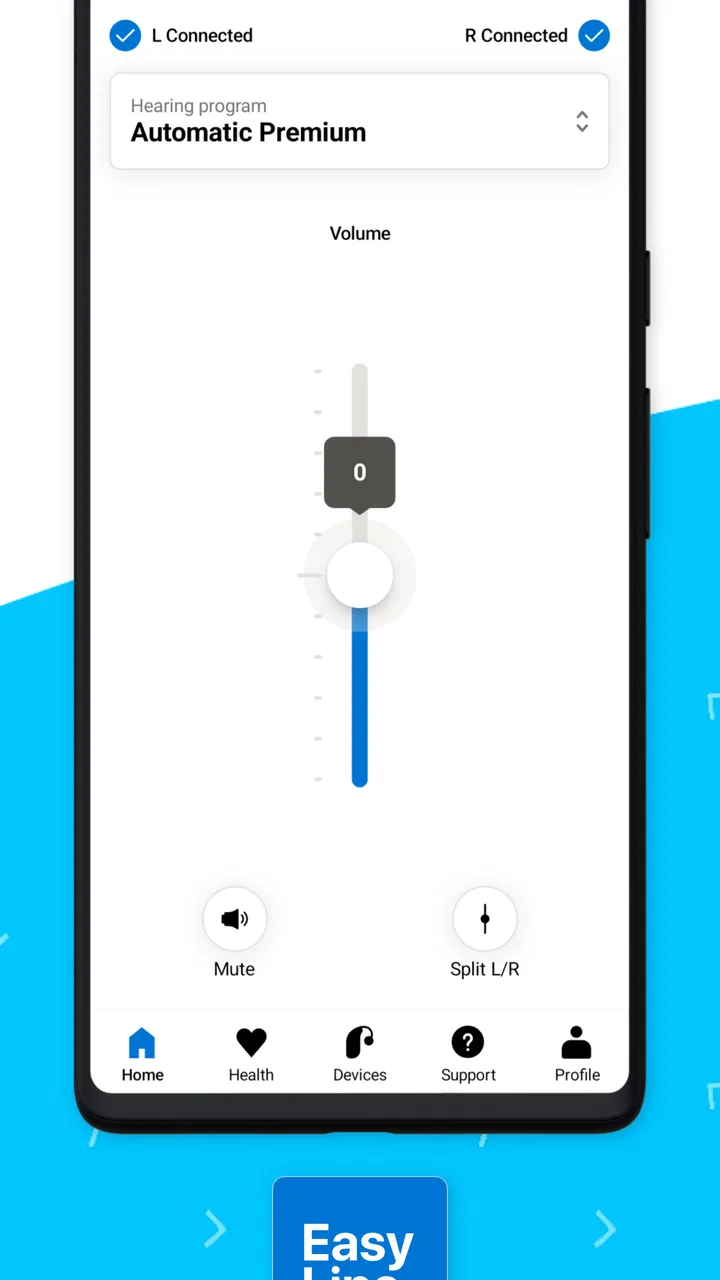
Easy Line Remote is a companion app designed for compatible hearing aids from the Easy Line range. After pairing the hearing aids with a supported smartphone, users can adjust volume, change listening programs, mute the devices, and access other available controls from the phone. Its exact features depend on the hearing-aid model, firmware, smartphone, and operating-system version.
02Which hearing aids and smartphones are compatible with Easy Line Remote?
Compatibility is not universal, so checking the official compatibility information before downloading is important. Easy Line Remote is intended for selected Easy Line hearing aids and may require a compatible Android or iPhone model with Bluetooth enabled. Some functions, including direct audio streaming or remote-control options, can vary by device. Updating both the app and hearing-aid firmware may also be necessary.
03How do I pair Easy Line Remote with my hearing aids?
To pair the app, install Easy Line Remote, enable Bluetooth, and follow the in-app setup instructions. In many cases, the hearing aids must be restarted or placed near the phone so they enter pairing mode. Keep both devices close together during setup and grant the requested permissions. If pairing fails, restarting the app, Bluetooth, or the hearing aids often helps.
04Can Easy Line Remote replace an audiologist or hearing-aid adjustment appointment?
No. Easy Line Remote is intended to provide convenient everyday control, not to replace professional hearing care. You can use it to make basic adjustments supported by your hearing aids, but fitting, programming, hearing tests, and troubleshooting medical or comfort issues should be handled by an audiologist or hearing-care professional. Avoid making changes that cause discomfort or affect safe hearing.
05Does Easy Line Remote require an internet connection, and is it free to use?
The app is generally available as a free download, although the hearing aids themselves require separate purchase and professional fitting where applicable. Basic remote-control functions may work through the phone’s Bluetooth connection without continuous internet access. Internet access can still be needed for downloading the app, updates, support resources, or certain optional services. Availability and features may differ by region and device.
Pros
- Simple setup for controlling compatible devices remotely.
- Clean interface makes common controls easy to find.
- Useful for managing devices from another room.
- Supports convenient shortcuts for frequent actions.
- Lightweight app with minimal storage requirements.
Cons
- Works only with compatible Easy Line devices.
- Some features may require the device to stay online.
- Remote response can vary with network quality.
- Limited usefulness without supported hardware nearby.
- May need occasional reconnection after device or router changes.

Easy Line Remote
Gallery